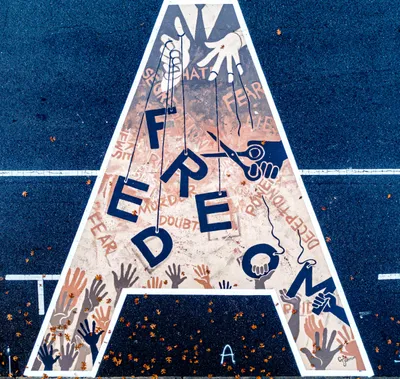
First Street Mural by artist Cameron Johnson. 2020. | Flickr (edited by the Author)
issue #227 of brennan.day
A Full Guide to Properly Delete Corporate Social Media Accounts

brennan.day — issue #227
Publisher: Brennan Kenneth Brown
Place of publication: Calgary, Alberta, Canada
Available at: https://brennan.day
Contact: mail@brennanbrown.ca
When I began my journey on the IndieWeb months ago, I made a promise to myself that I would delete my accounts on corporate social media platform siloes by the end of the year. For over a decade, there have been substantial arguments made about why people should delete these accounts, and the performance of people making the announcement they're deleting their Facebook account has become a meme itself.
And as I began undertaking this task in earnest, I realized how much work and complexity there is. You do not just click "delete account" and go on your merry way. It is a deceptively labourious task and will take a few weeks, not a single afternoon. And I figure it would help others if I wrote out a detailed guide for the process, of both logistics and the social aspects, from start-to-finish.
Note: This guide is specifically for Facebook, Messenger, Instagram, WhatsApp, Threads, X, Reddit, and Discord. There are many other popular corporate accounts that have established unethical track records and equally gnarly deletion processes. Perhaps there will be a part two for other platforms such as on Alphabet/Google, but I believe in taking steps in harm reduction over all-or-nothing total abstinence.
There is a real inconsistency to the whole process. Sometimes, everything is erased the second you confirm, others will keep your account in limbo for a month and if you open the wrong app everything is restored and you'll need to restart the process. And others will delete your account, but everything you've posted will stay online with your username scraped off.
So, all in all, this guide goes over 1) the prep work beforehand, 2) the technical logistics, and 3) the less-discussed human and social tasks that also need to be undertaken to ensure you aren't leaving things behind improperly. The prep work that has to happen before you touch a delete button. The technical logistics of what "delete" actually does on each platform. And the much less-discussed human logistics of doing all this without leaving anything important behind.
"Delete" Is a Fight You Have to Win
The answer to the questions "why move to the IndieWeb?" and "why does deleting these accounts need a guide?" is the same: These companies have spent years building products around your continued presence, have no product incentive to make leaving fast or obvious, and interface design reflects that. There are often dark patterns, which are interface choices deliberately built to nudge you away from the option that's good for you and toward the one that's good for the platform.
The corporate web runs on an advertising model that profits from your continued presence, whether or not that presence is good for you, and I'm sure you're already aware that it isn't.
In 2018, the Norwegian Consumer Council published Deceived by Design, a report on the manipulation across Facebook, Google, and Microsoft and how these corporates coerced people to give up privacy-protective choices. Burying a deletion flow four menus deep inside something called "Accounts Centre," as Meta currently does across three of the eight platforms here, is one example.
The reason a formal, user-triggered deletion flow exists on any of these platforms at all is only because of the downstream of law, rather than any goodwill effort. The EU's General Data Protection Regulation enshrines what Article 17 calls the "right to erasure," a legal entitlement for a person to have their data deleted by whoever holds it, without undue delay, once certain conditions are met. Once that right existed for EU users, it encouraged deletion flows for everyone.
In IndieWeb vocabulary, the eight platforms in this post are what's called a silo[1]. Meta specifically, running four of my eight silos under one roof, gets its own wiki page describing the tangle.
STEP ONE: Before Deletion
Everything in this section is about the things you should do before you delete your accounts, because there are several things which are impossible and irreversible once you've done so.
Export
Some of these archives take days to process, so the move is to request all of them on day one, before you've decided your exact deletion order:
- Facebook: Settings & Privacy → Settings → Accounts Center → Your information and permissions → Download your information.
- Instagram: Same Accounts Center path → Download your information. Reportedly, large archives can take up to weeks to complete.
- X: Settings and privacy → Your Account → Download an archive of your data. You will get an email within 24–48 hours.
- Reddit: https://reddit.com/settings/data-request will export your posts, comments, upvotes, saved links, and search history as a JSON file. Can also take up to 30 days, and it does not include private messages or chat history so copy anything from those manually if it matters to you.
- Discord: User Settings → Privacy & Safety → Request all of my Data. Covers account, message, and server data.
- WhatsApp: There's no formal export tool, so you'll need to back up chats manually through Settings → Chats → Chat backup, or export individual conversations you want to keep.
- Threads: This is integrated in the Instagram data download, since the accounts share underlying data.
Audit 3rd-party Logins
If you've ever used "Log in with Facebook," "Log in with X," or "Log in with Discord" on some other site or tool, deleting the parent account locks you out of that other service.
- Facebook/Instagram: Accounts Center → Your information and permissions → Apps and websites. Disconnect them, or better, go into each connected app individually first and switch it over to a plain email-and-password login.
- X: Settings → Security and account access → Apps and sessions → Connected accounts.
- Discord: User Settings → Authorized Apps.
Cancel Subscriptions
Deleting the account does not automatically cancel subscriptions, such as:
- X Premium has to be cancelled first (Settings → Premium → Manage Subscription)
- Reddit Premium keeps billing you even after account deletion unless cancelled separately.
- Discord Nitro needs cancelling under User Settings → Subscriptions.
Direct Messages
Messages you sent will often survive in the other person's inbox after your account is gone, but your own copy and your ability to reference it disappear. Screenshot or copy out anything that matters before you start.
STEP TWO: The Human Side
The technicals of account deletion have documentation (however opaque those docs might be), the much harder and unclear part is when these accounts are load-bearing for relationships, client work, and communities you're in. For most people, the social aspect is why they haven't deleted already. And this needs to be addressed before deletion as well.
Some of these accounts represent years of friendship and community. Conversations, inside jokes, people who found each other because of the platform itself. Walking away from that is not nothing just because it's an ethical call. I don't think there's anything wrong with treating the last login to an old Discord server, or the final scroll through years of Reddit comment history, as a small ritual rather than a chore to clear off a list. Grief and impermanence show up in strange places. A login screen is one of the stranger ones.
Before deleting anything, go platform by platform and figure out who you need to contact. Messenger and WhatsApp often have family and friends who only ever reach you through that specific platform. So get people's alternate contact information before deleting.
If you moderate a community on Discord or a group on Facebook, that's also important to pre-emptively organize and make sure they're managed by others you trust if you aren't proactively migrating them to a different platform or deleting them entirely.
Make a post on each platform that gives people options to contact you. Give your own grace period between annoucing your deletion and the actual process so people have time to contact you. This is what I shared:
email: mail@brennanbrown.ca
bluesky: @brennan.day
fediverse: @brennan@social.lol
xmpp: @brennan@omg.lol
text/phone: ask!
These are just a few examples. I also linked to the accounts page on my blog which lists out my accounts on a wide variety of other platforms.
I've also linked people to my IndieWeb Guide so that they can have tools and resources if they choose to join me in leaving corporate social media platforms and silos.
Running a business like Berry House also means addressing the professional logistics as well. Check anywhere that client-facing contact information exists (proposals, invoices, the site itself, email signatures, etc.) for mentions of Messenger, WhatsApp, or Discord handle, etc. and update those.
If a Facebook Page or Instagram professional account has portfolio pieces or client testimonials, that content is also deleted during personal account deletion even with the export tools available, so anything worth keeping needs to be archived separately, and screenshotted if there's no other option. Active clients should get a heads-up about the change in contact channels.
STEP THREE: The Technical Logistics
Here's what "delete account" does, platform by platform, as of writing this in July 2026. I've linked each platform's own help documentation, which you should reference because the specifics of these annoyingly change at random.
Take your time with this. Start with the accounts you use the least, and work outward from there.
The Meta Tangle
Five of the eight platforms, Facebook, Messenger, Instagram, WhatsApp, and Threads, are all Meta products, and they are tangled together:
- Deleting Facebook also deletes Messenger. There is no independent Messenger deletion. If you want to keep Messenger, you have to keep Facebook.
- Deleting Instagram does not delete Facebook. They're separate accounts managed through the same Accounts Center, but deleting one doesn't touch the other.
- Deleting Instagram can disrupt Threads. Meta's own help documentation for Threads warns that if the Instagram account associated with Threads is deleted, that will also delete the Threads profile. Threads should be deleted before Instagram, not after.
- Threads has been independently deletable since December 2023. Before that, the only way to delete a Threads profile was to delete the whole Instagram account underneath it, which caused enough backlash that Meta added a standalone deletion path.
- WhatsApp is fully independent of all of the above. It's tied to your phone number rather than a Meta login, and has its own deletion flow entirely.
The best order to do this in is to first Threads, then Instagram, then Facebook (which will also delete Messenger). WhatsApp can be deleted whenever.
Grace Periods
Some platforms will give grace periods for deleted accounts, which means if you re-login you'll have to go through the deletion process again. Reddit and WhatsApp are two exceptions, they delete everything instantly and permanently.
| Platform | Grace period | Recoverable how | Official docs |
|---|---|---|---|
| 30 days, plus up to 90 more for backups to fully clear | Log back in | Meta Help Centre | |
| Messenger | Tied to Facebook | Same as Facebook | — |
| 30 days | Log back in | Instagram Help Centre | |
| Threads | 30 days | Log back in | Instagram Help Centre |
| None | Not recoverable | WhatsApp FAQ | |
| X | 30 days (deactivate, then wait) | Log back in during the window | X Help Centre |
| None | Not recoverable, not even by Reddit staff | Reddit Help | |
| Discord | 14–15 days | Log back in during the window | Discord Support |
Platform-by-Platform Steps
- Threads: Open the app, tap your profile icon, then the menu icon, then Account → Deactivate or delete profile → Delete profile. Confirm with your Instagram password.
- Instagram: instagram.com → profile picture → Settings → Accounts Center → Personal details → Account ownership and control → Deactivation or deletion. Select Instagram, choose delete, confirm with your password.
- Facebook: Same Accounts Center path as above, but select your Facebook account. If you administer any Pages or Groups solely, transfer ownership first, or they get deleted along with your account.
- If Facebook Login is how you access anything else (Spotify, Pinterest, etc.) then you'll lose that access, so switch those to a direct login.
- WhatsApp: In-app: Settings → Account → Delete My Account, enter your phone number with country code, confirm.
- This is immediate and also removes your iCloud/Google Drive cloud backups, though a local backup already sitting on an Android device tends to survive — it just can't be pulled back into a restored account. You're automatically removed from every group you're in, and admin duties pass to someone else.
- X: Settings and privacy → Your Account → Deactivate your account, per the official flow.
- Logging back in through a connected third-party app cancels the deletion.
- Reddit: Settings → scroll to Advanced → Delete Account → confirm.
- Deleting your account does not delete your posts and comments re-attributed to "[deleted]" instead of your username, per Reddit's own help documentation.
- If you actually want the content itself gone, you have to remove it yourself first, either post by post or with a third-party bulk-deletion tool (worth researching their own privacy practices before handing over account access).
- Discord: User Settings → My Account → Delete Account, confirm with password and 2FA if enabled, per the official support article.
- If you own any servers, you have to transfer ownership or delete them first; Discord blocks account deletion otherwise.
- Messages you posted in servers persist afterward under a generic "Deleted User" label. Server history and DMs are not automatically scrubbed of what you wrote.
What Remains
Deleting accounts will never erase every trace of you or what you've done. It is speculated that most of your data is retained on the servers of these platforms. A few specific examples:
- Search engine caches. Google and Bing can show cached versions of profiles or posts can persist for weeks or months after the source is gone. Getting rid of those means a separate removal request through Google Search Console or Bing Webmaster Tools.
- Messages in other people's inboxes. Messages you've sent stay visible to the recipient.
- Screenshots and reposts. Of course, anything someone else saved, archived, quoted, or reshared while your account was live is permanently outside your control, deletion or not.
What This Was Actually For
A lot of people delete their social media as a way to do a digital detox and reduce their time in front of screens. It's a choice made to step away from the Internet and their Internet-connected devices entirely.
But this isn't the case for me. I have spent the last while building out fanfiction.lol and craft.wang and folk.zone, a self-hosted IndieWeb commons running on my own hardware for the sake of others. I am still in front of screens often: whether I'm writing these blog posts or coding projects or socializing on decentralized, non-corporate social media platforms. I don't think screens are necessarily the enemy.
Of course it's good to have tangible, non-digital hobbies and connect with the physical world and people face-to-face, but there is so much wonder and joy to still find in the Internet, just in places you might not have looked yet. I promise.
In IndieWeb vocabulary, a silo is a centralized platform, most social media qualifies, typically owned by a for-profit corporation that stakes a claim to content contributed to it and restricts your ability to take that content elsewhere. An exception to this is Threads, which does allow decentralized federation. The opposite concept is a commons. ↩︎


Comments
To comment, please sign in with your website:
How it works: Enter your website URL. IndieLogin signs you in through your site's IndieAuth server if it has one (e.g. indieauth.com), or checks your rel="me" links on GitHub, GitLab, Codeberg, and email. Setup instructions.
Signed in as:
No comments yet. Be the first to share your thoughts!