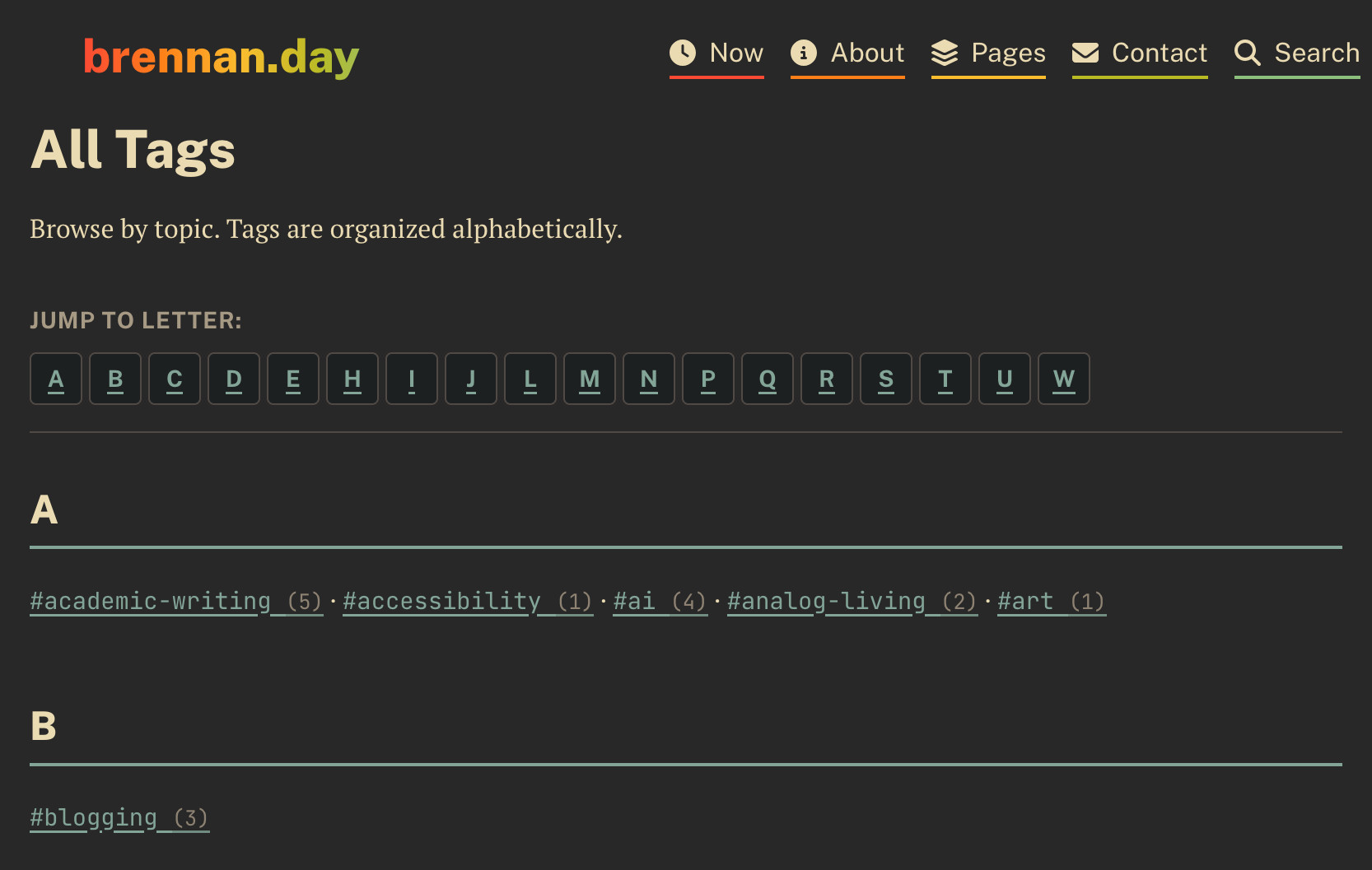
The current iteration of my tags page.
Creating an Alphabetical Tag Page feat. Nunjucks Pitfalls

When I originally made my blog, I barely skimmed the docs and I quickly wrote the tags page to simply have them all dumped into a single, unordered list. After writing and importing so many posts, it ended up being seventy-five tags in a messy pile. You'd have to parse through the wall of hashtags like #academic-writing, #accessibility, #ai, #blogging, #chronic-illness all jumbled together without any rhyme or reason.
What I envisioned instead was something with form and function, with tags starting with the same letter being grouped together, and as a bonus, a navigation bar to jump to each letter. That sounds easy, right?
Famous last words. Instead, spend a good couple hours being confused learning about the limitations of Nunjucks templating and implementing JavaScript filters for Eleventy collections.
A Simple Start
My first instinct was to modify the existing tags.njk template. What I originally had was short and simple.
<div class="tag-cloud">
{% for tag in collections.tagList %}
  {% set tagUrl %}/tag/{{ tag | slugify }}/{% endset %}
  {% set postsWithTag = collections.posts | filterByTag(tag) %}
  <a href="{{ tagUrl }}" class="tag-link">#{{ tag }} <span class="tag-count">({{ postsWithTag.length }})</span></a>
{% endfor %}
</div>
My idea was to use a Nunjunks macro to group tags by their first letter.
{% macro groupTagsByLetter(tags) %}
  {% set groupedTags = {} %}
  {% for tag in tags %}
    {% set firstLetter = tag | first | upper %}
    {% if groupedTags[firstLetter] %}
      {% set groupedTags[firstLetter] = groupedTags[firstLetter] + [tag] %}
    {% else %}
      {% set groupedTags[firstLetter] = [tag] %}
    {% endif %}
  {% endfor %}
  {{ groupedTags | sort }}
{% endmacro %}
Perhaps the more seasoned among you can already see what's wrong here.
Single Characters Everywhere
Instead of seeing #academic-writing (5) under the "A" section, there was:
#a (0) · #a (0) · #a (0) · #a (0) · #a (0) · #a (0) · #a (0) · #a (0)#b (0) · #c (0) · #c (0) · #c (0) · #c (0) · #d (0) · #e (0) · #e (0)
Every tag was being split into individual characters, and every count was zero.
What's Actually in the Collection?
My first thought was that something was wrong with the collections.tagList itself. I added debug output:
<!-- DEBUG: Show first 10 tags from tagList -->
<div style="background: #f0f0f0; padding: 1rem; margin-bottom: 2rem; font-family: monospace;">
  <h3>DEBUG: First 10 tags from collections.tagList:</h3>
  <ul>
    {% set counter = 0 %}
    {% for tag in collections.tagList %}
      {% if counter < 10 %}
        <li>{{ tag }} (first char: "{{ tag | first | upper }}")</li>
        {% set counter = counter + 1 %}
      {% endif %}
    {% endfor %}
  </ul>
  <p>Total tags: {{ collections.tagList.length }}</p>
</div>
The output was reassuring:
academic-writing (first char: "A")accessibility (first char: "A")ai (first char: "A")analog-living (first char: "A")art (first char: "A")blogging (first char: "B")
The tagList was fine. The tags were properly normalized (lowercase with hyphens instead of spaces). The first character extraction was working correctly.
Template Logic vs. Filter Logic
Then, I checked what was actually in the posts. I added more debug output:
<h3>DEBUG: Check first post tags:</h3>
{% if collections.posts.length > 0 %}
  {% set firstPost = collections.posts[0] %}
  <p>First post: {{ firstPost.data.title }}</p>
  <p>Tags: {{ firstPost.data.tags | join(', ') }}</p>
{% endif %}
This revealed the disconnect:
collections.tagListcontained:"academic-writing","accessibility","ai"- Posts contained:
"Creator Economy","Digital Culture","community","indieweb"
The Eleventy config was normalizing tags (lowercase, hyphens instead of spaces) for the tagList collection, but the original posts still had the original tag formats.
My Eleventy config already has a custom filterByTag function that's supposed to handle this normalization:
eleventyConfig.addFilter("filterByTag", function(collection, tag) {
  if(!tag) return collection;
  // Normalize the search tag - convert hyphens back to spaces for matching
  const normalizedSearchTag = tag.toLowerCase().replace(/-/g, ' ');
  return collection.filter(item => {
    return (item.data.tags || []).some(t => {
      // Normalize each tag from the post - convert to lowercase and compare
      const normalizedTag = t.toLowerCase().replace(/^"|"$/g, '');
      return normalizedTag === normalizedSearchTag;
    });
  });
});
The filter existed and should have worked, but the still-present zero counts meant it wasn't working.
Nunjucks String Iteration
When I used tag | first, Nunjucks was treating the tag string as an iterable and getting the first character. But the tags were being split into individual characters entirely. Switching from tag | first to tag.substring(0, 1) still had the tags rendered as single characters.
Custom JavaScript Filter
I eventually realized the issue was with how Nunjucks handles complex object manipulation in templates. The solution was to move the grouping logic into a custom JavaScript filter in the Eleventy config.
Object Return
eleventyConfig.addFilter("groupTagsByLetter", function(tags) {
  const grouped = {};
  tags.forEach(tag => {
    const firstLetter = tag.charAt(0).toUpperCase();
    if (!grouped[firstLetter]) {
      grouped[firstLetter] = [];
    }
    grouped[firstLetter].push(tag);
  });
  return grouped;
});
This also failed, Nunjucks can't iterate over object properties directly in templates. When I tried:
{% for letter in groupedTags %}
  {% set tags = groupedTags[letter] %}
  ...
{% endfor %}
The loop was hanging and never executed.
Array of Objects
Eventually, I realized Nunjucks could easily iterate over returning an array format:
eleventyConfig.addFilter("groupTagsByLetter", function(tags) {
  const grouped = {};
  tags.forEach(tag => {
    const firstLetter = tag.charAt(0).toUpperCase();
    if (!grouped[firstLetter]) {
      grouped[firstLetter] = [];
    }
    grouped[firstLetter].push(tag);
  });

  // Convert to array of objects for Nunjucks iteration
  const result = [];
  for (const [letter, tagList] of Object.entries(grouped)) {
    result.push({
      letter: letter,
      tags: tagList.sort()
    });
  }

  // Sort by letter
  return result.sort((a, b) => a.letter.localeCompare(b.letter));
});
Final Template
After a couple hours, this was the final result:
{% set groupedTags = collections.tagList | groupTagsByLetter %}

<nav class="alphabet-nav">
  <p>Jump to letter:</p>
  <div class="alphabet-links">
    {% for group in groupedTags %}
      <a href="#letter-{{ group.letter }}" class="alphabet-link">{{ group.letter }}</a>
    {% endfor %}
  </div>
</nav>

<div class="tags-alphabetical">
  {% for group in groupedTags %}
    <div class="tag-section">
      <h2 class="letter-header" id="letter-{{ group.letter }}">{{ group.letter }}</h2>
      <div class="tag-cloud">
        {% for tag in group.tags %}
          {% set tagUrl %}/tag/{{ tag | slugify }}/{% endset %}
          {% set postsWithTag = collections.posts | filterByTag(tag) %}
          <a href="{{ tagUrl }}" class="tag-link">#{{ tag }} <span class="tag-count">({{ postsWithTag.length }})</span></a>{% if not loop.last %} · {% endif %}
        {% endfor %}
      </div>
    </div>
  {% endfor %}
</div>
Making it Pretty
Here's the CSS I added:
/* Tags page alphabetical layout */
.tags-alphabetical {
  margin: 2rem 0;
}

.tag-section {
  margin-bottom: 3rem;
}

.letter-header {
  font-size: 2rem;
  font-weight: 800;
  margin: 0 0 1rem 0;
  padding-bottom: 0.5rem;
  border-bottom: 2px solid var(--accent-primary);
  color: var(--fg);
  scroll-margin-block-start: 12rem;
}

.alphabet-nav {
  position: sticky;
  top: 5rem;
  background: var(--bg);
  padding: 1rem 0;
  margin-bottom: 2rem;
  border-bottom: 1px solid var(--border);
  z-index: 5;
}

.alphabet-link {
  display: inline-flex;
  align-items: center;
  justify-content: center;
  width: 2rem;
  height: 2rem;
  background: var(--panel);
  border: 1px solid var(--border);
  border-radius: 4px;
  color: var(--fg);
  text-decoration: none;
  font-weight: 700;
  transition: all 0.2s ease;
}

.alphabet-link:hover {
  background: var(--accent-primary);
  color: var(--bg);
  transform: translateY(-1px);
}
Conclusion
Nunjucks templates are great for simple logic, but complex data manipulation should be moved to JavaScript filters. The template engine has limitations around complex object iteration, and string manipulation can confuse the parser.
Data normalization matters. There was a disconnect between normalized tag names in collections and original tag names in posts. I needed to consider how the normalized data would be used in templates when building collections.
When things go wrong:
- Verify data sources (what's actually in the collections?)
- Check transformations (are filters working?)
- Simplify templates (remove complex logic)
- Add incremental debug output
Custom filters, unlike templates, are powerful. Eleventy's custom filter system is great for data manipulation. Moving logic from templates to JavaScript filters makes things more readable, has better debugging, and is more maintainable.
My tags page now groups 75 tags into 18 alphabetical sections, provides sticky navigation for quick jumping, and maintains the existing tag filtering functionality.
Simple-sounding features almost always leads to interesting technical challenges. At least I get a blog post out of them!
Comments
To comment, please sign in with your website:
Signed in as:
No comments yet. Be the first to share your thoughts!