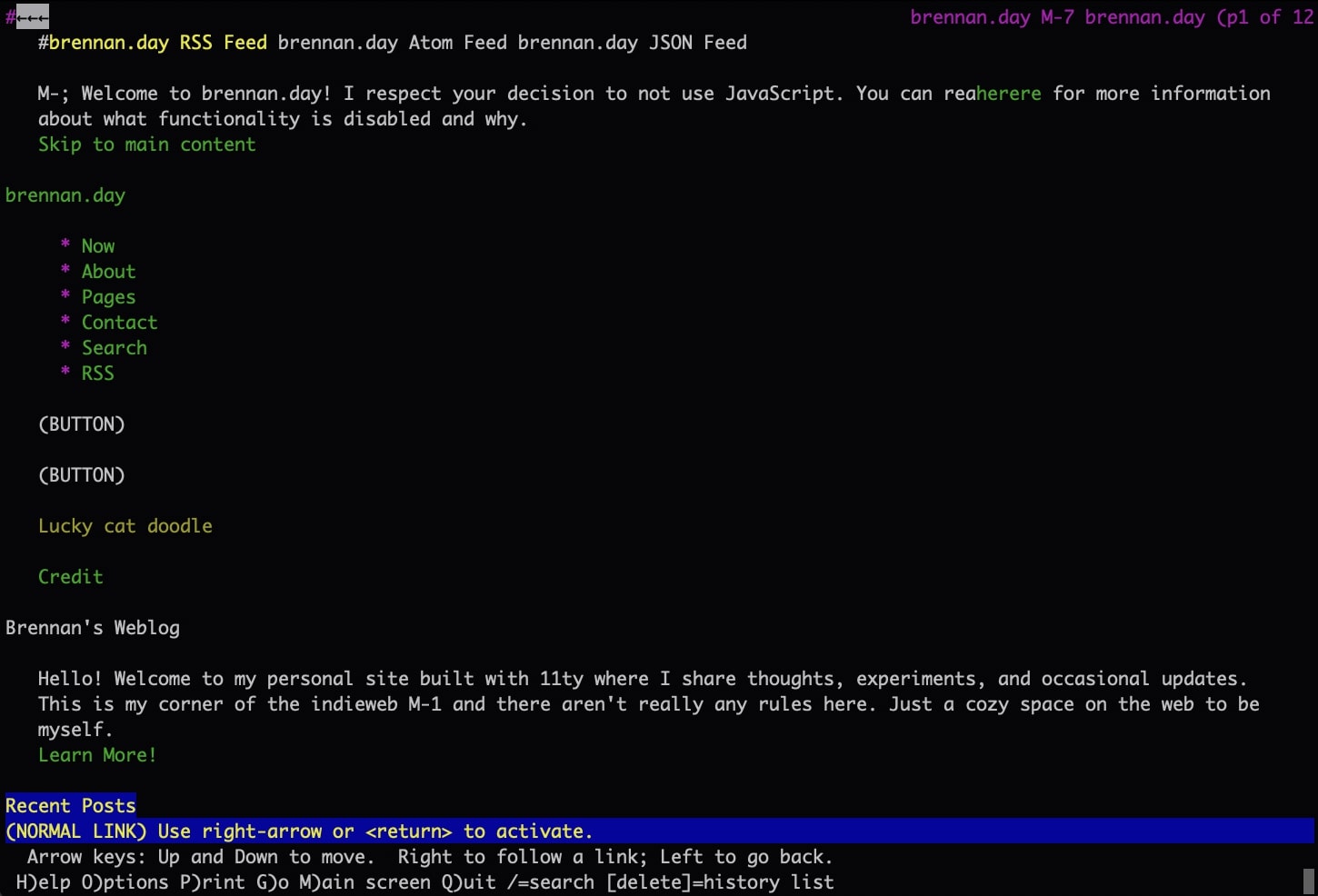
My site viewed through Lynx, a terminal-based web browser.
Respecting the No-JS Choice: Making Your Site Work for Everyone

In my most recent posts, I've been tinkering and getting into the weeds of programming my site.
A lot of developers, I feel, are programming for a rather homogeneous end-user: they are viewing the site on the latest mobile or desktop device with the latest operating system, and on the latest supported browser (which most likely has Chrome underneath the hood).
There are luckily some wins we still keep up with, like responsive design due to the wide array of different screen sizes (there was a point in time where app developers only needed to have their app in one screen size on iOS, because there was only one iPhone screen resolution). But otherwise, it is a monolithic responsibility given to the end user: you need to buy recent devices, you need to run a certain up-to-date OS, and you have to use a web browser that most likely doesn't respect your privacy.
This is a lot to ask for, if not outright hostile to the end-user.
With this in mind, I've been thinking about accessibility and optionality. Not just screen readers or keyboard navigation (those kind of things should be default baked-in), but accessibility respecting user choice and how they choose to interact with the Internet.
With that, I decided to go through the process of better making my site properly degrade for users without JavaScript.
Why Bother with No-JS?
If we're being honest, most web developers demand JavaScript be used by the end-user. Sites are built with extensive (read: bloated) frameworks like React or Vue, fetching data dynamically and adding all sorts of complex interactivity where JavaScript is absolutely required.
But what about users who choose to disable JavaScript? There are many reasons for this decision:
- Privacy-conscious users who block all scripts by default
- People on slow connections or who are using older technology where JavaScript lags the experience or might not even be an option
- Certain users of assistive technology
- Terminal browser users
- People simply trying to conserve battery on mobile
Like with all accessibility principles, the end result is a better experience for all users, not just those who the accessibility is built for. Disabling JavaScript is a choice, and as web builders, we need to respect that choice.
What Was Breaking?
In my process of adding various easter eggs and extending functionality, I have ended up with several JavaScript-dependent features on my site:
- The comment system (IndieAuth authentication, form submission)
- Status.lol widget in the sidebar
- Theme toggle for dark/light mode
- Search functionality (Pagefind)
- Newsletter signup form
- Post graph visualization
- Various other interactive elements (tooltips, easter eggs, etc.)
Without having JavaScript enabled, users were given no explanation nor any alternative. Parts of the experience simply broke with awkward empty spaces.
The Solution: CSS-Based Progressive Enhancement
The approach I settled on is this: start with no-js and let JavaScript remove it. This is a form of progressive enhancement, which differs from graceful degradation.
<!DOCTYPE html>
<html lang="en" class="no-js">
Then, the very first script that runs:
// Remove no-js class immediately when JS is enabled
document.documentElement.classList.remove('no-js');
This creates two states automatically:
- With JavaScript:
.no-jsis removed, everything works normally - Without JavaScript:
.no-jsstays, and we can style accordingly
Hiding the Right Things
With the .no-js class in place, I can now hide JavaScript-dependent features:
/* Hide JavaScript-dependent features when JS is disabled */
.no-js .js-required {
  display: none !important;
}

.no-js #theme-toggle {
  display: none !important;
}

.no-js .comments-section {
  display: none !important;
}

.no-js #status-lol-container {
  display: none !important;
}
But just hiding things isn't enough. We need to explain what's happening:
.no-js .status-container::after {
  content: "Status updates require JavaScript to be enabled.";
  font-style: italic;
  color: var(--muted);
  display: block;
  padding: 1rem;
  text-align: center;
}
The Noscript Message
I added a friendly <noscript> message at the top of the page:
<noscript>
  <p>🌻 Welcome to brennan.day! I respect your decision to not use JavaScript. You can read <a href="/no-js/">here</a> for more information about what functionality is disabled and why.</p>
</noscript>
When a user disables JavaScript, the majority of sites simply do not function at all, and will tell a user that they must enable JavaScript to continue. A slightly better alternative will have messaging asking the user nicely to enable JavaScript (so the site can work and stop being broken). Even better than that, a site will acknowledge and state that "some features require JavaScript".
But the best thing you can do is outright state that it's okay for the end-user to not use JavaScript, and provide an explanation of what they're missing out on and what alternatives you can offer them.
This is what I did. The link in the noscript message goes to /no-js/, which is a dedicated page explaining:
- What works without JavaScript (all content, navigation, RSS, etc.)
- What requires JavaScript and why
- Alternatives for each feature
- My commitment to accessibility
It's a resource for users to understand the trade-offs and make informed decisions, which is their right.
Testing with Lynx
How do you know if your site really works without JavaScript? Test it in an environment where JavaScript doesn't exist. Lynx is a text-based web browser that's perfect for this.
# Install Lynx (if you don't have it)
brew install lynx

# View your site
lynx http://localhost:8080
Looking at my site through Lynx was revealing. The noscript message appeared at the top. The status section showed empty (as expected). The search page had no search interface. But all the content was there, all the links worked, everything was navigable (though with a couple rendering issues I will have to work out on my own, later).
Implementation Details
Here's the complete approach I used:
1. HTML Structure
<html class="no-js">
<body>
  <noscript>
    <p>🌻 Welcome! I respect your decision to not use JavaScript.
       <a href="/no-js/">Learn more</a> about what's disabled.</p>
  </noscript>

  <!-- Your content here -->

  <script>
    // Remove no-js class immediately
    document.documentElement.classList.remove('no-js');
  </script>
</body>
</html>
2. CSS Rules
/* Hide JS-dependent elements */
.no-js .js-required,
.no-js #theme-toggle,
.no-js .comments-section,
.no-js .post-graph {
  display: none !important;
}

/* Show helpful messages */
.no-js .status-container::after {
  content: "Status updates require JavaScript.";
  font-style: italic;
  color: var(--muted);
}

/* Style the noscript message */
noscript {
  display: block;
  background: var(--panel);
  border: 1px solid var(--accent-primary);
  padding: 1rem;
  margin: 1rem 0;
  text-align: center;
  border-radius: 4px;
}
3. Mark Interactive Elements
Add js-required class to elements that need JavaScript:
<button class="theme-toggle js-required">Toggle theme</button>
<div class="post-graph js-required">...</div>
What I Learned
Progressive enhancement is always kinder than graceful degradation. Start with a working baseline, then enhance.
Don't hide features, explain what's happening and why. Users respect when you respect their choices.
Test in real environments. Browser dev tools can simulate no-JS, and booting up a terminal-based web browser isn't that difficult either.
None of this is that difficult. The CSS-based approach I've outlined is simple to implement and maintain.
The web needs to be able to work for everyone, regardless of their technical choices or constraints. Making your site no-js friendly means building a more inclusive, respectful web for everyone
Resources
If you want to make your site no-js friendly, here are some helpful resources:
- A List Apart: Progressive Enhancement
- MDN: Progressive enhancement
- Lynx browser for testing (or using!)
The best no-js experience is one where users don't feel like they're missing out.
What are your thoughts on no-js browsing? Have you made your site accessible without JavaScript? I'd love to hear from you, whether in the comments below (if you have JS enabled) or via your own blog with a webmention if you don't!


Comments
To comment, please sign in with your website:
Signed in as: